Material takeoffs from piping isometrics

The takeoff doesn't have to take all week.

PipeTakeoff reads the bill of materials on every isometric, builds the MTO and prices it from your own catalog and past quotes. Your estimators check lines instead of typing them, so the same team can bid more work.

  • Try it here on one of your own drawings
  • 1,000 free extractions with an account, no card
  • Nothing reaches your MTO until an estimator commits it

Instant audit

FREE · NO ACCOUNT
Tap to uploadOne CAD-exported iso PDF · up to 3 pages · 10MB max
No drawing on hand? Try our sample, ISO-1042-001.pdf.

Results expire after 24 hours, and uploads are deleted within 48 hours. Processing runs on Anthropic under standard commercial API terms.

01 · How it works

Upload the isos. Review the lines. Export.

  1. 01

    Upload isos

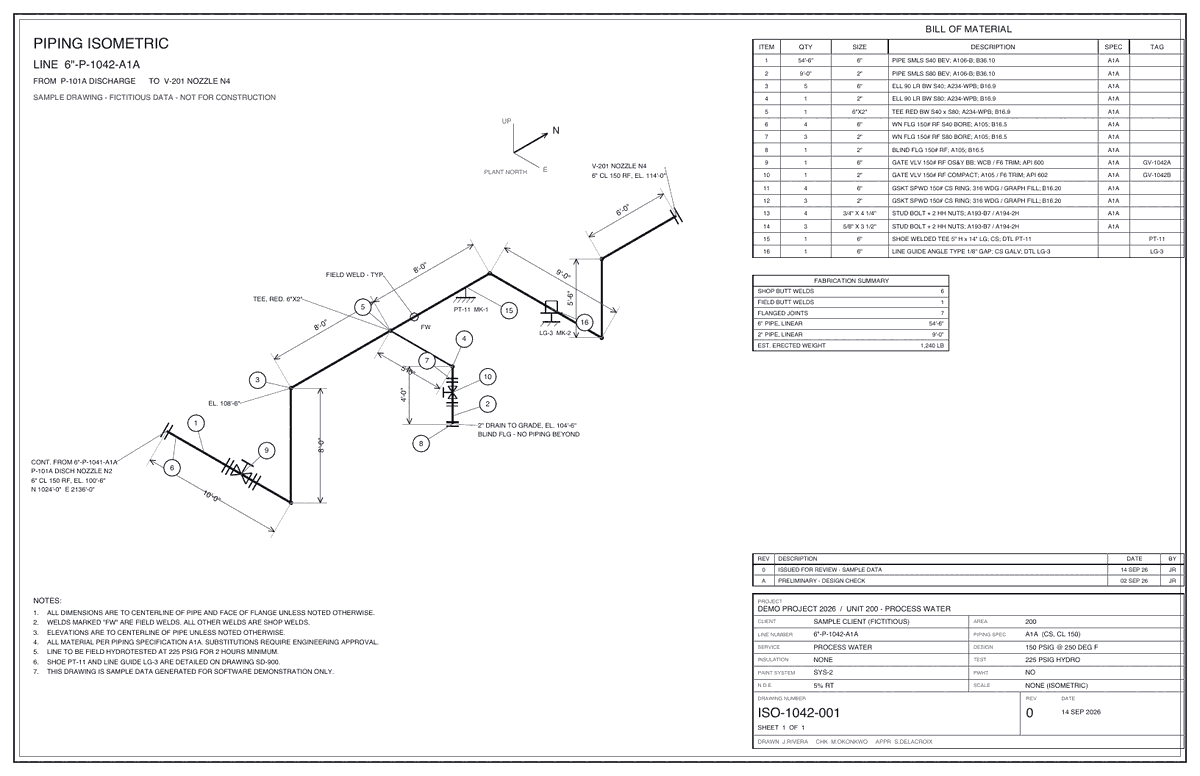
    Drop the whole bid package as one PDF. Every page is sorted for you: isos, BOM continuation sheets, P&IDs, plans, spec sheets. Confirm the split and the isos go to extraction.

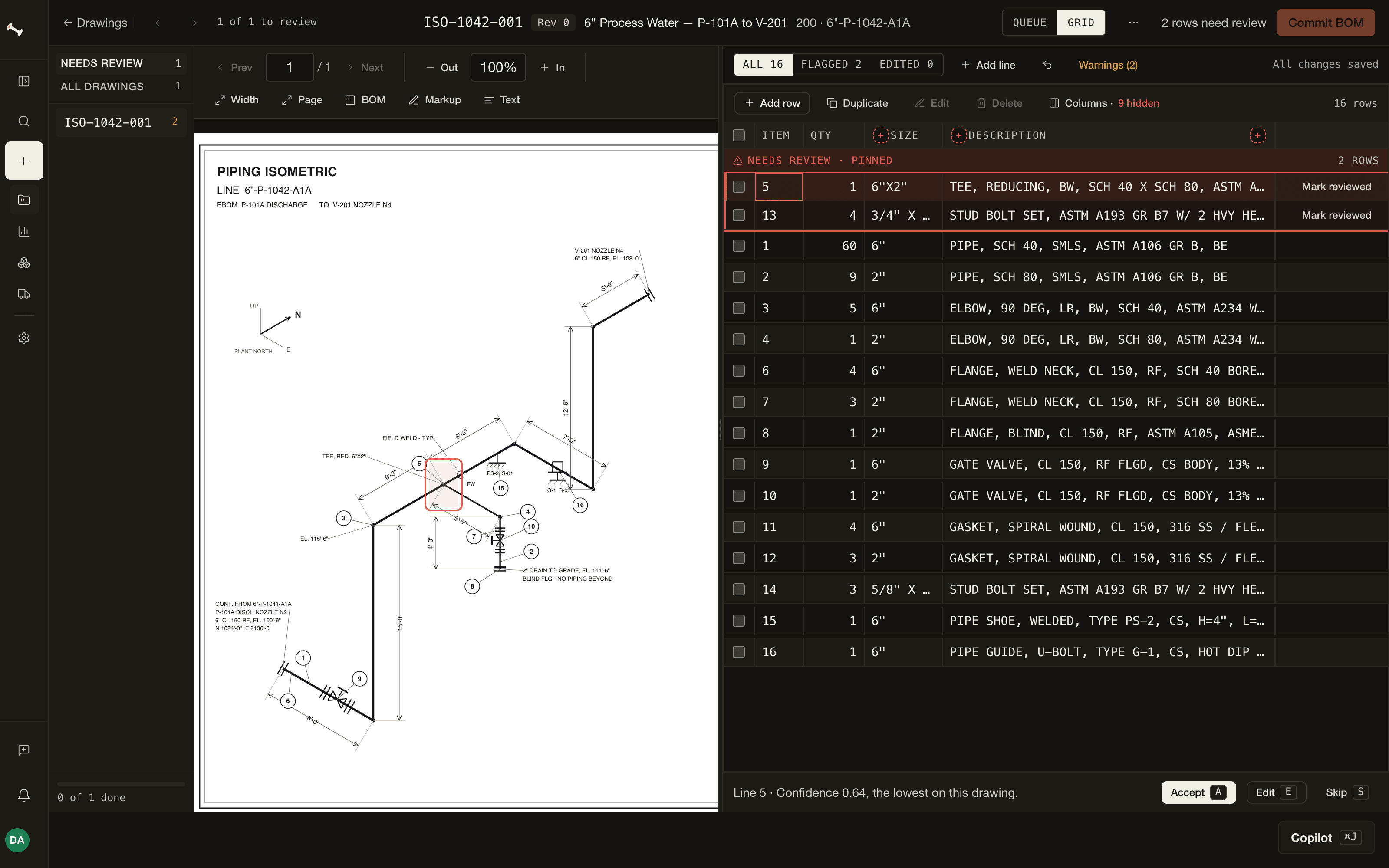
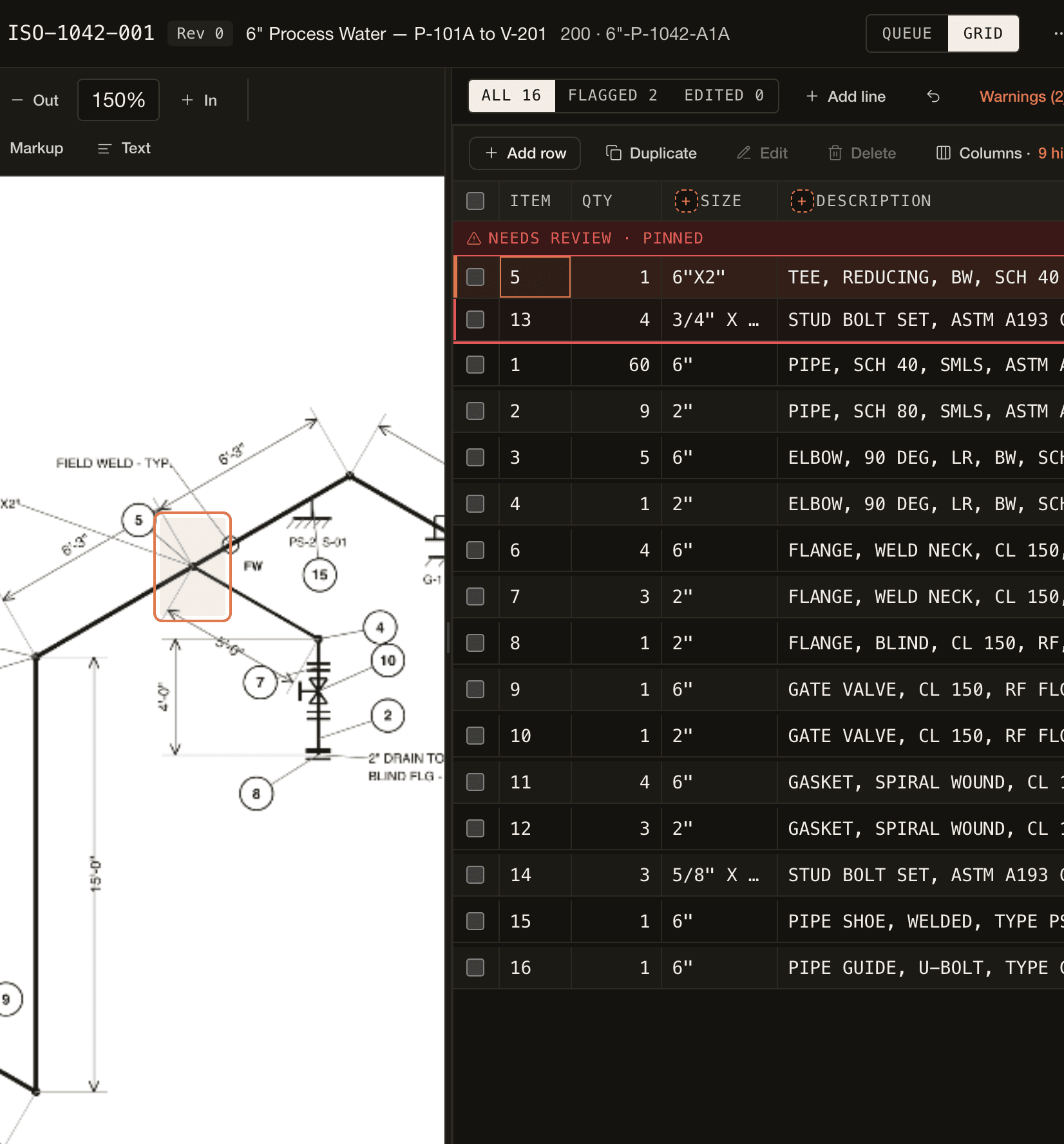
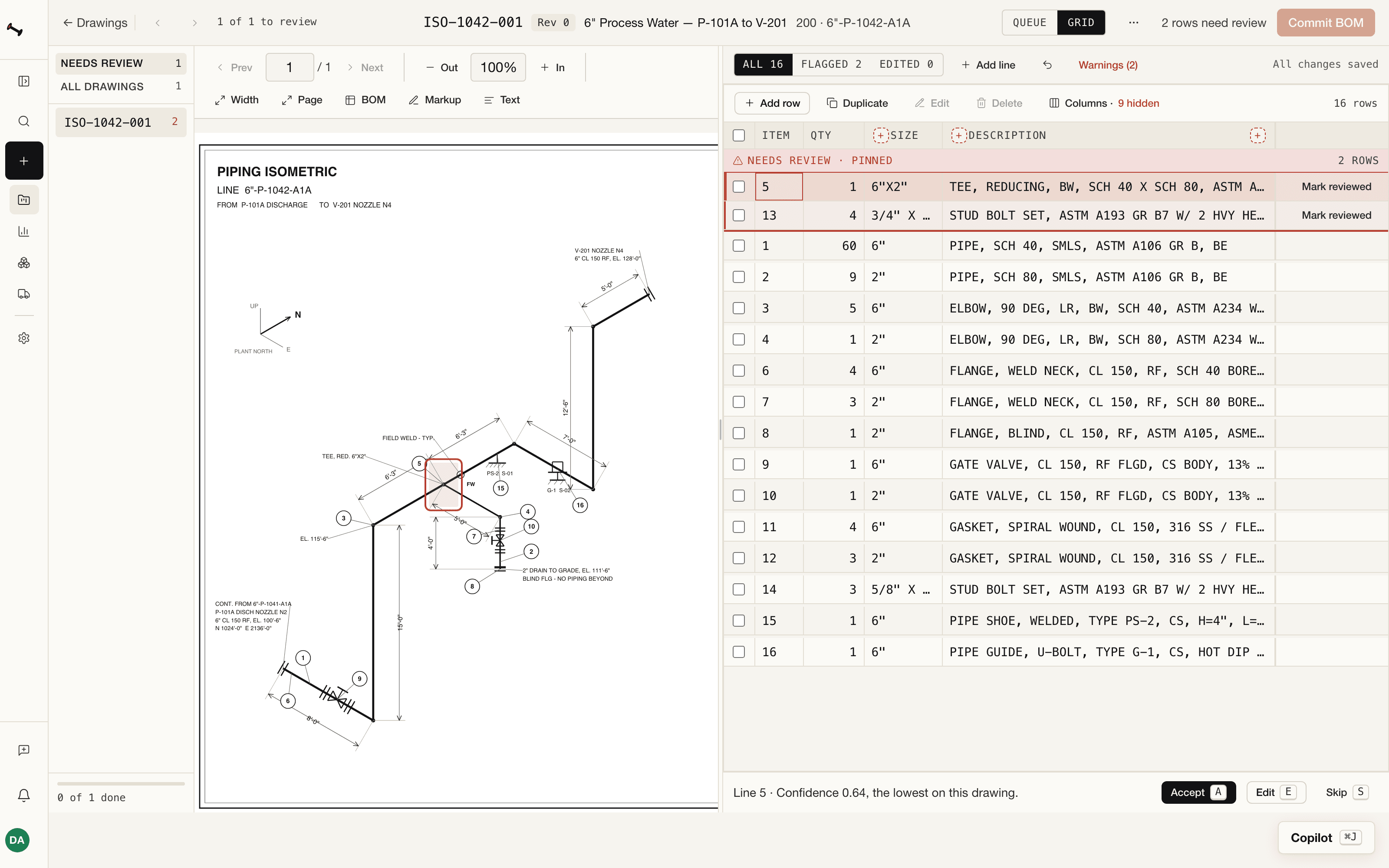
  2. The review screen in dark mode: the iso on the left, the lines read from its BOM table on the right.
    02

    We read the BOM table

    Whatever columns your BOM prints, in whatever layout: qty, size, schedule, material, description and spec, plus material codes and valve tags. Each line gets a confidence score.

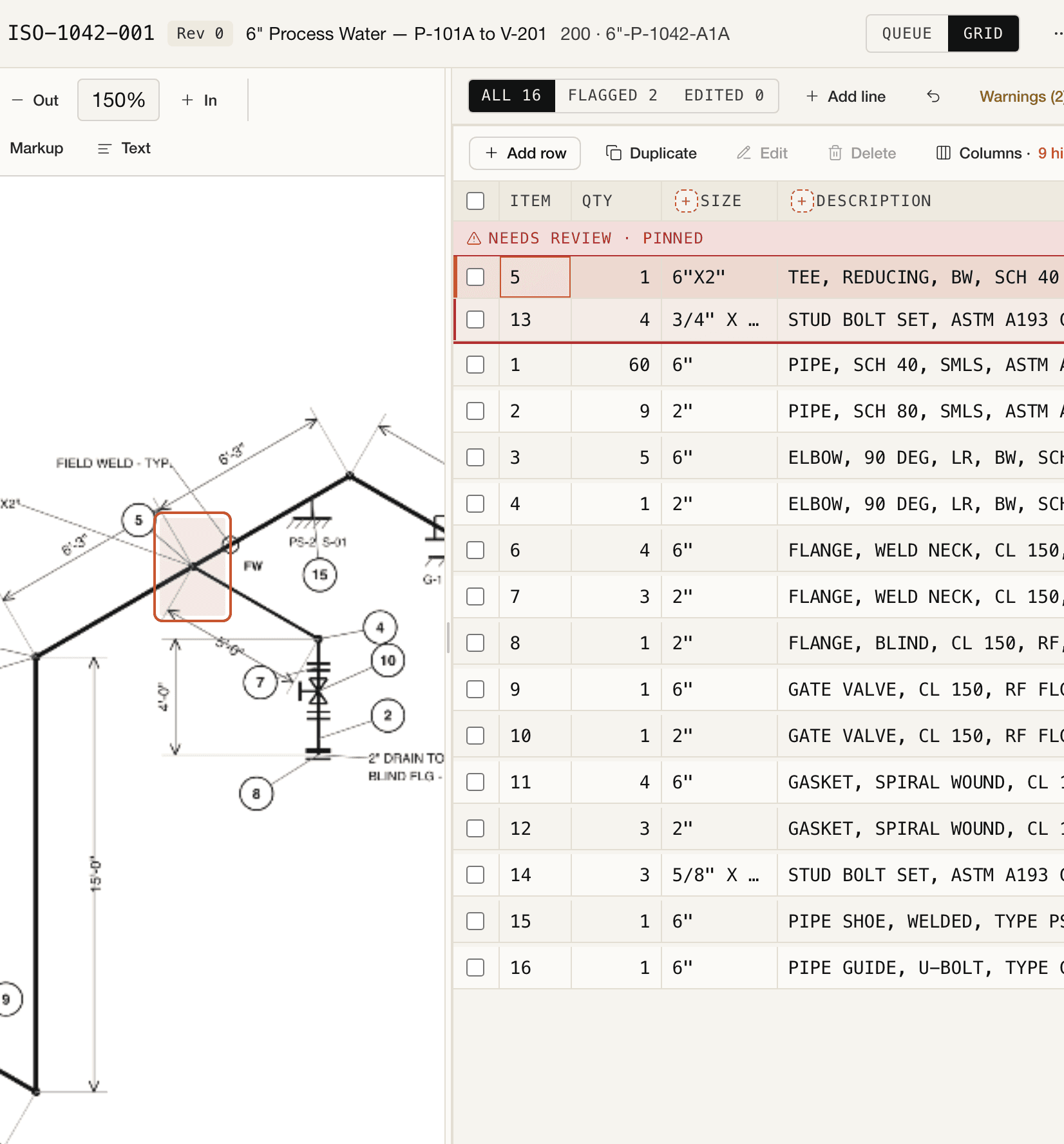
  3. A flagged line selected on the review screen, with its callout boxed on the drawing.
    03

    Review, commit, export

    A grid that works like Excel. Commit the lines to your MTO once you've checked them, then export it, priced from your catalog and past quotes, to xlsx or csv.

The whole run on the real screen: one package PDF in, split into drawings, reviewed, committed and exported to xlsx. 2 min.

The same 500 isos, with and without PipeTakeoff

One bid package, two ways to get the MTO.
The way it's done todayWithout PipeTakeoffAn estimator types every BOM into Excel
Day 1 of 5
of 500 sheets typed
41
estimator hours so far
3h
typos not yet caught
2
The new wayWith PipeTakeoffBOMs read for you, then reviewed
Done · Day 1
BOM tables typed by hand
0
estimator review, flagged lines first
4h
isos committed without an estimator
0
Illustrative: 5 min per sheet typed, 12 lines per sheet, 1 typo per 200 lines, 30 s per sheet to review.
02 · The review screen

Click a line. See where it came from.

Your estimators check lines instead of typing them. Every flagged row says why it was flagged. Open the sample, fix the flagged lines and commit it, right in your browser.

Try the interactive demo
Review is a required step

Every extraction goes to an estimator first. Nothing reaches your MTO until they commit it.

Flagged rows say why

Low confidence, a description cut short, conflicting specs: the reason is printed on the row.

Every decision is on the record

Every edit, commit and re-extract is written to a hash-chained audit log, so a changed entry shows.

Get this screen back for one of your own isos in about a minute.
03 · After the takeoff

The committed MTO keeps working through revisions, quotes and pricing.

Rev B arrives Friday at 4. Immediately see what changed.

Each new revision is compared line by line against the last one you committed. Lines already on an RFQ are flagged, so you know before material is ordered.

Rev B differs from Rev A, the last committed revision.1 added · 1 removed · 2 changed
  • 09ELBOW 90° LR 1½" A234-WPBAdded1
  • 02PIPE 1½" NS SMLS SCH 40SQuantity changedwas 10 ftnow 14 ft
  • 04VALVE ½" 150# RF · ends SW×SWAttribute changed · Rev A: FL×SW1
  • 06INSTR. CONN. PI A03E 1½"Removed · awarded · RFQ-014was 1now —
208 UNCHANGED
DWG 12-N-5
Rev B, as uploaded. Changed rows in the BOM table in blue; the added elbow in green.

Start with the four changes

Filter the grid to what changed: removed, added, quantity and attribute changes against the last committed revision.

Know when a change hits an RFQ

See if any of the changes in the latest revision impact RFQs that have already been sent out or bids that have already been received.

See the change on the drawing

Switch the drawing between Rev A and Rev B, with the changes highlighted on the drawing.

You stay in control

Nothing reaches the MTO until an estimator commits the revision, and the commit is written to the audit log.

Also in every project

  • Project copilotAsk about the MTO, prices, revisions or drawings in plain English. Answers come from the project's own data.
  • ReportsExtractions, edits and an hours-saved estimate by week and by project, plus a printable monthly report.
  • SearchFind any project, drawing, or MTO line quickly.
  • Your whole teamUnlimited users, with owner, admin, engineer and viewer roles.
  • Markups and remindersMark a missing item or wrong size on the drawing. Drawings left waiting on review send reminders.
  • Imperial and metricEA, FT, IN, LB, M and MM. Prices convert between length units.
Every line nobody retypes is time back for the next bid. Start a free project and upload your first isos.
From the founder

Why I built PipeTakeoff.

I spent years doing material takeoffs (MTOs) by hand. The work was the same every time: open a PDF, count fittings, type rows into Excel, double-check schedules, and pass the MTO to a buyer. The drawings kept changing, and the takeoff and RFQs would inevitably fall behind.

PipeTakeoff.com is the tool I wish I had. Upload the iso, and it reads the BOM table printed on the drawing into an MTO for you to review, then exports to the format your buyer expects.

You stay in the loop. The AI never commits on its own: you check every line against the drawing and you make the calls. The typing goes away.

Matt Laux, founder of PipeTakeoff.com

Matt Laux

Founder, PipeTakeoff.com

Read the full story
04 · Pricing

Start free. Then one monthly plan, with your drawings included.

On the paid plan, $399 a month includes 1,000 drawings, and each drawing after that in the same month adds $0.50. A drawing is billed once, so revisions are free.

Free

$0for your first project

  • Up to 1,000 extractions
  • Stays free when you upgrade
  • Send up to 5 RFQs, 5 vendors each
  • No credit card, no time limit
Create free account →

Platform

$399/ month

  • 1,000 drawings a month included
  • $0.50 per drawing after that
  • Unlimited projects, revisions, users
  • Each drawing is billed once, so revisions, re-extractions and quote review are free
  • Material catalog and price history from your own quotes
  • RFQs, vendor portal, line-by-line award
  • xlsx + csv export of every committed MTO
Create free account →
05 · Questions

Your bid packages stay yours.

  • Encrypted in transit and at rest
  • Row-level tenant isolation
  • Tamper-evident audit log
  • Two-factor available on every account; admins can require it
  • Your drawings never train AI models
  • Stored in the US
How we protect your drawings →
What does the free tier cover?

Your first project, up to 1,000 extractions in total, and up to 5 RFQs with 5 vendors each. No credit card and no time limit. Re-extracting a drawing counts as another extraction.

How does the paid plan bill?

$399 a month includes 1,000 drawings. Each drawing above that in the same month adds $0.50. A drawing is billed once, the first time it is extracted, so revisions, re-extractions and quote review never add to it. The allowance resets on the 1st of each month (UTC).

Is there a limit on drawings?

No. Above 1,000 drawings in a month, each drawing adds $0.50. Users and projects are unlimited.

How accurate is it?

It reads what the BOM table says, and it marks the lines it is unsure of. Every change to the extraction is tested against drawings graded by hand, and a change that reads worse doesn't ship. Either way, an estimator checks every line before it goes into the MTO.

Will it read our drawing style?

Yes, with nothing to set up. It reads the BOM table however your drawings lay it out, including material or item codes and valve tag numbers when the table has those columns. Tags that appear only as callouts on the drawing, outside the BOM table, aren't read yet.

What does switching cost?

Nothing to migrate. Upload the drawings on your desk; export xlsx and send RFQs exactly as you do now. How to evaluate AI pipe takeoff software

Do you train on our drawings?

No. We never train or fine-tune on customer drawings, and our model provider's commercial terms prohibit it.

Where is my data?

Stored in the US: PDFs in Cloudflare R2, structured data in Neon Postgres (US-East). Row-level isolation is enforced at the database.

Don't take our word for it. Try it on one of your drawings.

Drop a PDF anywhere on this page, or start a free project with 1,000 extractions and see how much of the next bid nobody has to type.

No card · No sales call · Audit files up to 10 MB, deleted within 48 h