How to Do a Piping Takeoff from Isometric Drawings
By Matt Laux, founder of PipeTakeoff
A piping takeoff can look complete while one superseded sheet, one dropped BOM row, or one wrong unit is still hiding in it. The safest way to build a material takeoff (MTO) is to treat each drawing as a traceable source, then prove the project rollup agrees with those sources before pricing. Here is a workflow you can use with a spreadsheet or takeoff software.
Scope first: this guide is for isometrics with a printed bill-of-materials (BOM) table. It covers extracting and checking that table. If your drawing has no usable BOM, measuring or deriving quantities from geometry is a separate exercise, and the steps below are not a substitute for it.
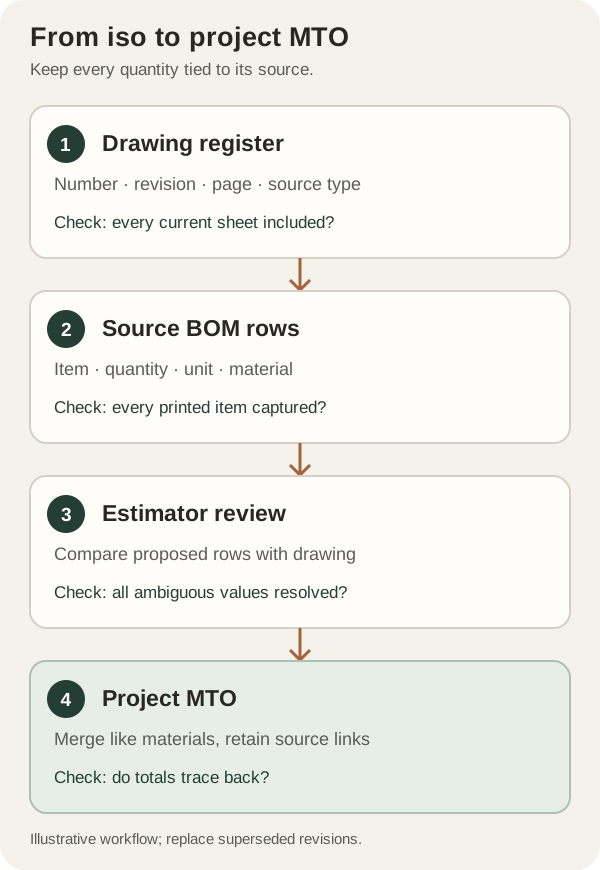
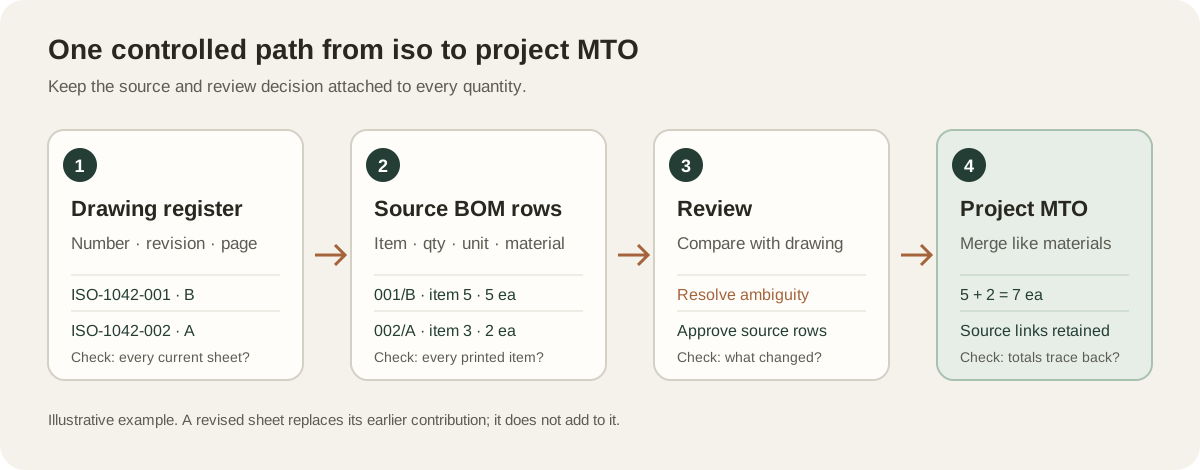
1. Freeze the drawing set before you count
Start a drawing register with one row per drawing number and revision. Record the source file, page range, received date, and whether it is native PDF or a scan. Compare it with the transmittal. A drawing in the transmittal but absent from the package is an RFI, not a zero-quantity sheet. If two revisions are present, mark one as superseded before you total anything.
| Drawing | Rev | Source | Status |
|---|---|---|---|
| ISO-1042-001 | B | package-02.pdf, p. 8 | Current |
| ISO-1042-001 | A | package-01.pdf, p. 6 | Superseded; exclude |
| ISO-1042-002 | A | package-02.pdf, p. 9 | Current; scanned |
Keep the register separate from the item list. It lets you answer two different questions: Did we receive every drawing? Did we capture every material row on every current drawing? A grand total alone cannot answer either one.
2. Read the table and the drawing together
For each current iso, transcribe the printed BOM table into source rows. Preserve drawing number, revision, item number, quantity, unit, size, description, and the piping class or material designation shown on the sheet. Do not erase the original description when you later standardize it; keeping both values makes a disputed purchase traceable.
Then inspect the drawing for notes that affect interpretation: continuation references, field versus shop scope, alternate materials, and handwritten changes. An item bubble can help locate a component, but a bubble count is not automatically the BOM quantity. When the table and the drawing disagree, record the conflict and get it resolved rather than silently choosing the convenient number.
| Source | Item | Description as printed | Qty | Unit |
|---|---|---|---|---|
| 001 Rev B | 1 | 6 in pipe, SCH 40, A106 Gr B | 60 | ft |
| 001 Rev B | 5 | 6 in 90° LR elbow, A234 WPB | 5 | ea |
| 002 Rev A | 3 | 6" ELB 90 LR BW, A234 WPB | 2 | ea |
| 002 Rev A | 8 | 6 in pipe, SCH 40, A106 Gr B | 18 | ft |
The two elbow descriptions can roll up to seven elbows only after you confirm the same size, angle, radius, end connection, schedule or wall requirement, and material. The two pipe rows total 78 ft only because their units and material identity agree. Do not merge on description similarity alone.
3. Make the source-to-MTO handoff auditable
A useful row key is drawing number + revision + BOM item number. If item numbers repeat or are missing, add the page and row position. Keep it beside the normalized purchasing description. This is the bridge between a vendor's question about one line and the exact cell on the source sheet.
- Pipe length versus piece count. A quantity of 60 may mean feet, metres, or pieces. Store the unit explicitly and convert only with a documented rule.
- Similar but different wall designations. Do not casually collapse SCH 40, SCH 40S, and STD. Confirm the governing piping class and nominal size before treating them as equivalent.
- Reducing components. Record both run and branch or inlet and outlet sizes. A 6 × 2 tee is not a 6 × 4 tee.
- Bolts and gaskets. Check whether the table counts sets, individual studs, or packages. The number can look plausible in every case.
- Supports, specials, and notes. Keep them visible even if your material pricing workflow handles them separately. An excluded row should be an explicit scope decision.
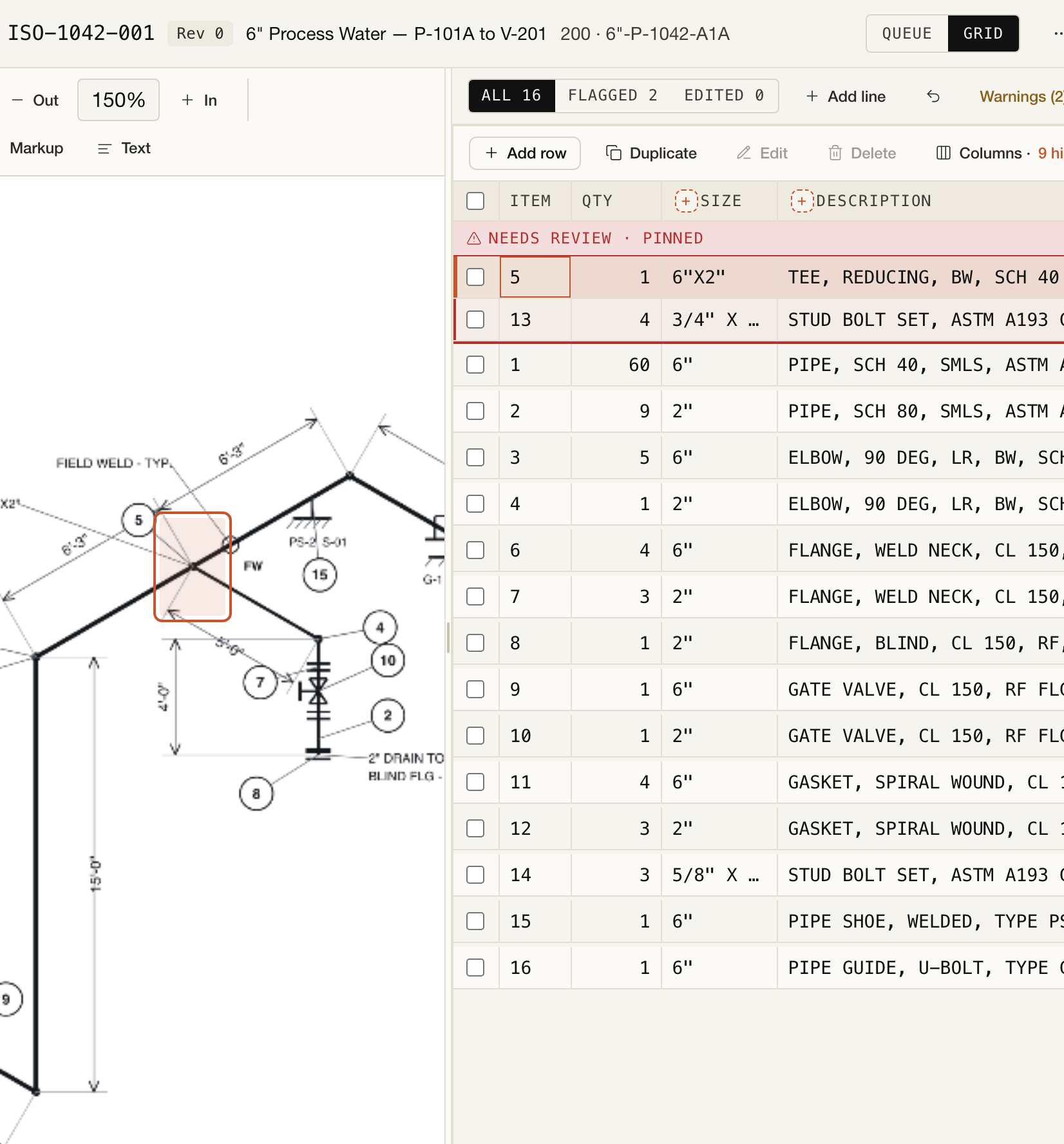
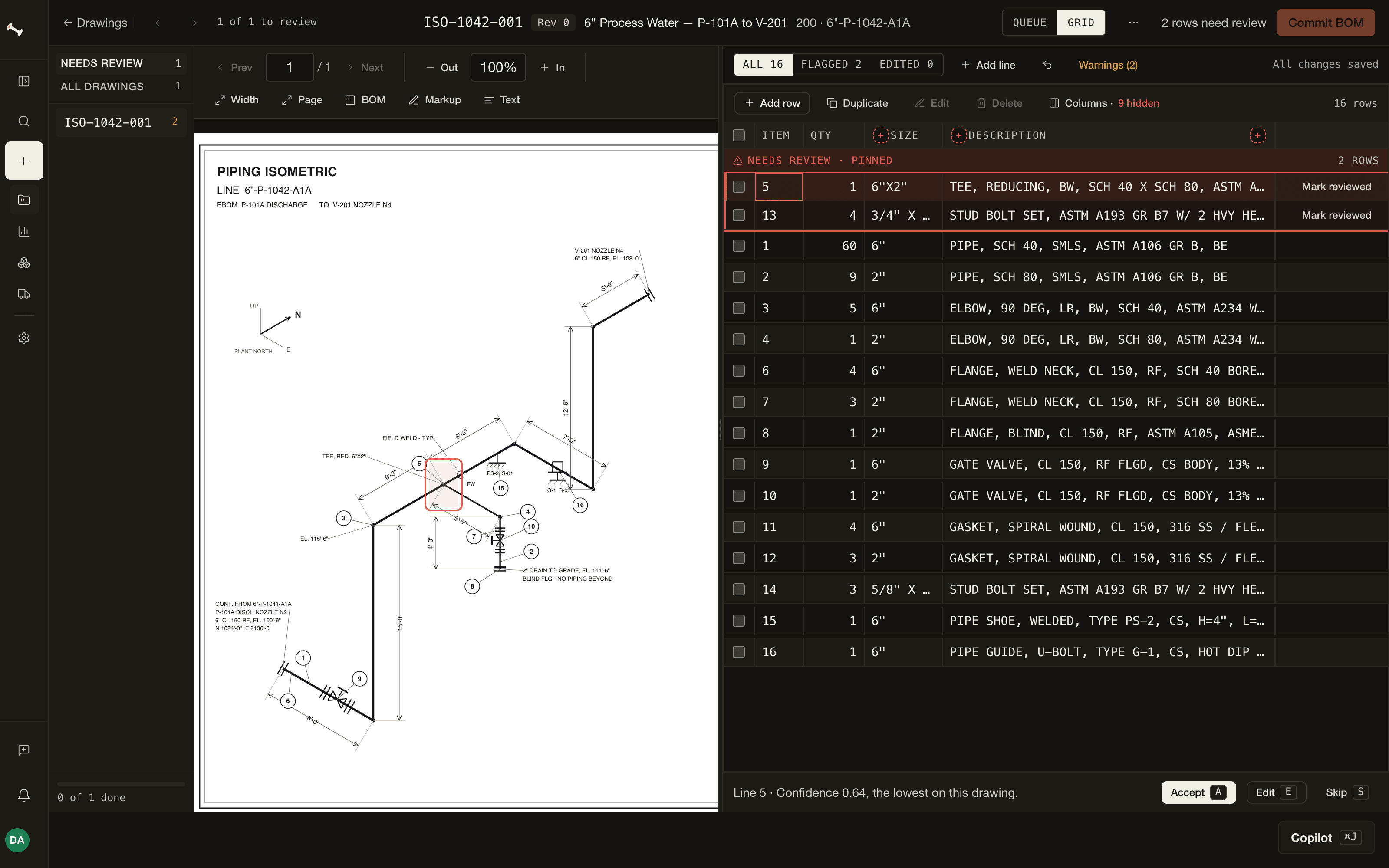
The image below is a capture of PipeTakeoff's real review screen using a synthetic drawing. The drawing stays beside the extracted rows, and the two flagged rows remain visible before approval. Open the image at full size to inspect the grid.
4. Reconcile before you roll up
For each drawing, compare captured BOM item numbers with the printed table, including continuation pages. A row-count match is a useful alarm, but not proof of correctness: a duplicate row can conceal a missing row. Also compare the distinct item identifiers and spot-check source cells for high-cost, high-quantity, and low-confidence lines.
Next, normalize only materials that are genuinely interchangeable for purchasing. Roll up quantities by the complete material identity, not by a loose text match. Keep a drill-down from each project MTO line to every contributing drawing row. That drill-down is how you answer why the total changed after an addendum.
| Project MTO line | Contributing rows | Total | Check |
|---|---|---|---|
| 6 in SCH 40 A106 Gr B pipe | 001/B item 1; 002/A item 8 | 78 ft | 60 + 18 ft |
| 6 in 90° LR A234 WPB elbow | 001/B item 5; 002/A item 3 | 7 ea | 5 + 2 ea |
If Rev C of ISO-1042-001 changes item 5 from five elbows to six, replace Rev B's contribution with Rev C's. The new project elbow total is eight, a delta of +1. Adding Rev C on top of Rev B would produce 13 and double-count the superseded sheet.
5. Perform a bid-ready review
Before the MTO goes to a vendor or pricing sheet, inspect the exceptions. Review the scanned sheets, handwritten changes, missing table rows, unit conversions, and materials that normalized together. Compare the register's current-drawing count with the drawings represented in the MTO. Keep an explicit list of exclusions and unresolved RFIs alongside the export.
- Transmittal and received pages agree; missing drawings are logged
- One current revision is selected for each drawing number
- Every printed BOM item is represented or explicitly excluded
- Quantity and unit are checked together on every source row
- Piping class, size, wall, material, and end connection survive normalization
- Scans, markups, and table-versus-drawing conflicts have review notes
- Every project total drills back to current drawing rows
- Revision deltas and unresolved RFIs are visible before pricing
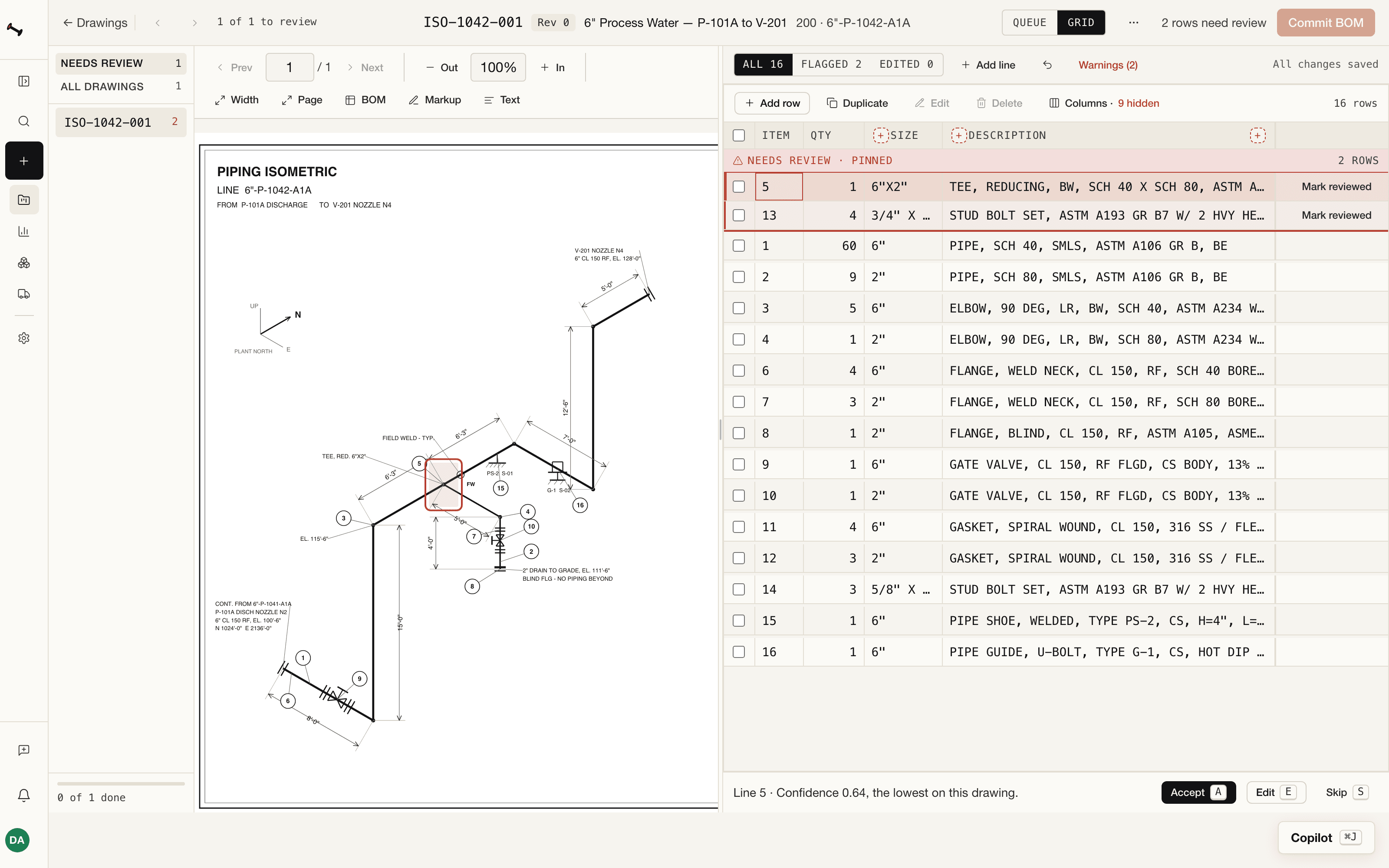
For a mixed-quality package, use the scanned isometric review guide to decide which sheets deserve a second source or a line-by-line read. For a quick view of how the app moves from a package to an MTO, watch the recording below.
If you are weighing software to help with this work, the questions in how to evaluate AI pipe takeoff software apply to any tool, ours included.
PipeTakeoff proposes rows from printed BOM tables and puts them beside the source drawing for estimator review. Try a project or read how we measure extraction quality.